River Flight Retro Game Online: Fly a Pixel Plane for Free
River Flight is a retro-style flying game you play free in a browser, steering a small plane along a winding river until the next obstacle ends the run. Nothing to download, no account needed, and the controls are as simple as they come. Below we cover how it plays, how to fly further and which similar free arcade games are worth a go.
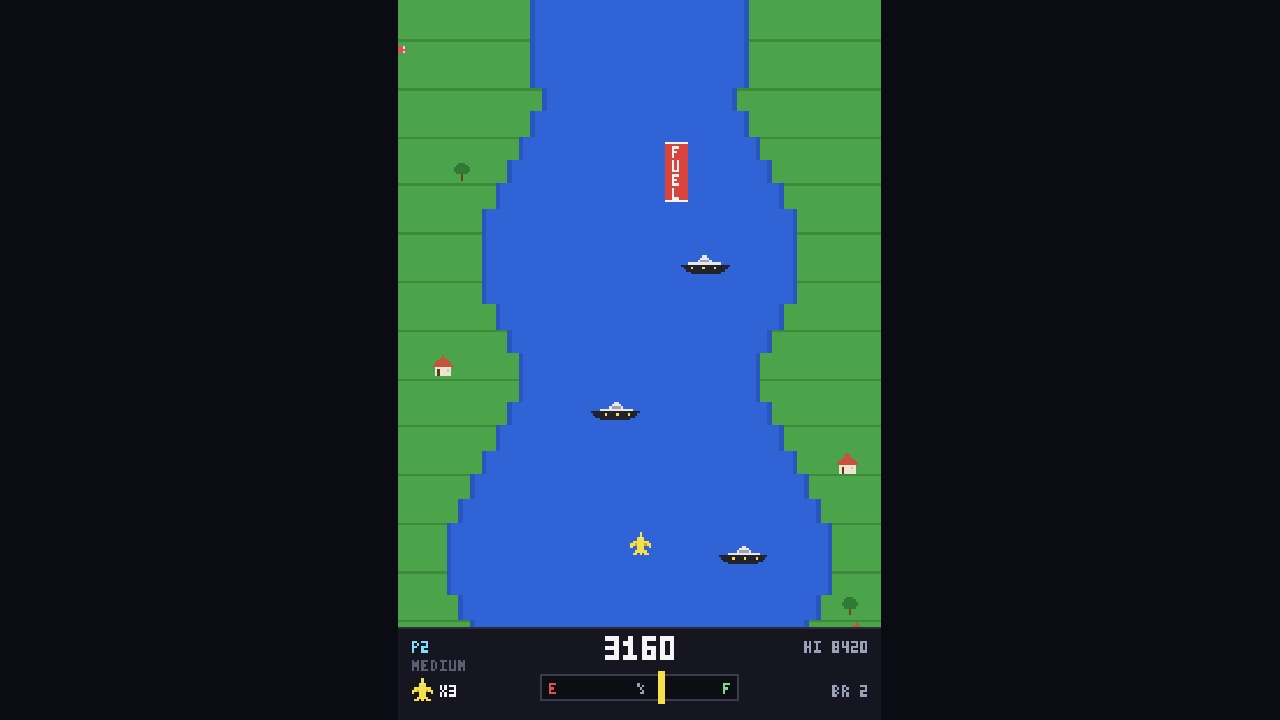
- River Flight is a free browser game that requires no download, no login and no payment on phone, tablet or desktop.
- A run ends the moment the plane touches the riverbank, a bridge or a rock, and the game restarts almost immediately.
- A single-button control scheme lets the same game work with a mouse, a keyboard and a touchscreen without a separate version.
- Retro pixel art and limited colour palettes keep load times short on older laptops and mid-range phones.
Everything on Gameoto runs in the browser, so there is no install and no account to set up.
What Is River Flight and How Do You Play It?
River Flight is a browser arcade game in which you steer a small plane low along a river, dodging obstacles and trying to stretch each run a little further than the last.
River Flight is a side-scrolling arcade game with a deliberately old-school look. You fly a small plane along a winding river while the scenery scrolls past, and the whole job is to hold a steady line. Tap or click to climb, release to drop. That is the entire control scheme.
The retro feel comes from more than pixel art. It comes from the way the game asks one thing of you — keep flying — and refuses to clutter that with menus, currencies or tutorial walls. You press start and you are in the air.
Runs are short by design. Clip a bank, a bridge or a rock and the attempt is over, but the reset is near-instant, so another go is only a second away. That quick loop is what makes the game hard to put down.
Why Retro Flight Games Keep Pulling Players Back
Retro flight games endure because they pair a one-button control scheme with a difficulty curve that always makes the next attempt feel winnable.
Flight games have been an arcade staple since the late 1970s, and the ones that lasted share a trait. They are easy to start and quietly hard to master. River Flight follows that rule without apology.
There is a practical reason the format suits a browser. A single-button control works with a mouse, a trackpad, a touchscreen or a keyboard, so the game feels near-identical on a phone and on a desktop, and nobody has to learn a control map first.
Retro presentation ages well too. Chunky sprites and a limited palette do not need a powerful graphics card, so a run loads quickly on an older laptop or a mid-range handset. Fewer polygons, faster start, less waiting around.
There is also something honest about a score that only measures distance. No unlocks, no grind, no advantage bought with time — just how far you got before the river won.
How to Fly Further in River Flight
Flying further comes down to looking well ahead, making small corrections early and learning the repeated obstacle patterns rather than reacting at the last moment.
Most failed runs come from reacting too late. The river bends ahead of you, and once an obstacle fills the screen there is nothing left to do about it. Watch further up the screen than you think you need to.
Use short taps rather than long holds. A long hold sends you climbing hard, and the drop afterwards is difficult to recover from. Small repeated taps keep your altitude predictable and leave room to adjust when the channel narrows.
Obstacle patterns repeat, so a few attempts teach you the rhythm of each stretch. Treat the first couple of runs as a recce and stop chasing a score; distance arrives once you already know what is coming.
On a phone, keep your thumb steady near the screen edge and avoid shifting your grip mid-run. Movement across the display adds wobble to every input, and wobble is what ends runs.
Free to Play in Your Browser, With No Login
River Flight runs free in any modern browser on a phone, tablet or computer, with no download, no sign-up and no payment involved.
Every game on Gameoto runs in the browser. There is nothing to install, no app store detour and no account to set up. Open the page, start the game and you are playing within seconds.
That matters more than it sounds. Downloads eat storage, updates interrupt, and sign-up walls break the flow of a five-minute break. A browser game fits neatly into the gaps in a day — a commute, a lunch hour, the wait before dinner.
Nothing sits behind a paywall either. The games are free to play, and they work on phones, tablets and computers rather than demanding one specific device. If you want to check the setup first, there is a short about page explaining who runs the site.
More Free Arcade and Puzzle Games to Try Next
After a few runs at River Flight, the same collection offers free arcade and puzzle games that suit the same short, no-commitment sessions.
Flying gets tense, so it can help to switch genres for a while. Puzzle games slow the pulse and still fit the same short-session shape, which makes them good company on a quick break.
Paper Heist rewards thinking a move or two ahead, a different muscle to the reflex work of dodging riverbanks. If you like your pressure with a puzzle attached, it is a tidy change of pace.
There are reflex and arcade games in the same collection if you would rather stay in that lane. Browse the list, pick whichever looks interesting and try it — nothing is locked, metered or hidden behind a timer.
Session length is worth thinking about too. A game you can pick up for two minutes and abandon without penalty suits a browser far better than a long campaign would, and that is the shape of most of the titles here.
You can open River Flight and be airborne before the kettle boils.
Frequently Asked Questions
Is River Flight free to play?
Yes. It is free, and so is everything else on Gameoto. You do not have to pay, sign up or install anything.
Do I need to download an app to play?
No. It runs in the browser on phones, tablets and computers, so there is no app store trip and nothing added to your storage.
What are the controls?
Tap or click to climb, let go to drop. That is it — one input, no combos and no buttons to memorise.
Does it work well on a phone?
It does. Single-button controls translate cleanly to a touchscreen, though a steady thumb helps a lot.
Why do my runs end so quickly?
Usually because you are reacting to what is already on screen. Look further ahead, use shorter taps and give yourself two or three runs to learn each pattern.