Flipverse: A Free Online Game Where You Flip Gravity, No Download
Flipverse is a free browser game where gravity obeys you instead of the other way around: flip it and the ceiling becomes a floor you can walk on. You guide a character across a 3D sky course, gather three Prism Shards in each world, and step through the portal that opens once the set is complete. Seven worlds, one mechanic, and nothing standing between you and the first jump.
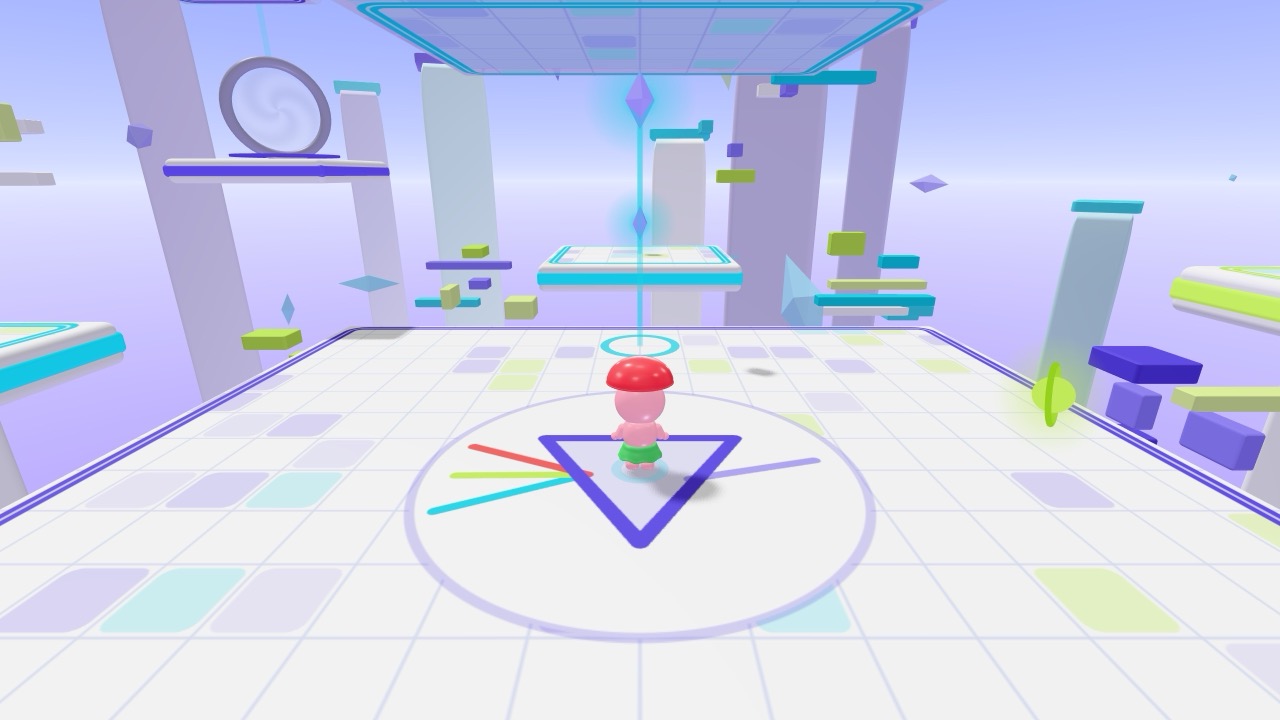
- Flipverse is built on one mechanic: flipping gravity so ceilings become walkable floors.
- Each Flipverse world contains three Prism Shards, and the exit portal stays shut until all three are collected.
- Flipverse runs in the browser with no download, no login, and no payment step.
When the flipping starts to wear thin, Orbit Hop on the same site is a lighter arcade break before you go back for the next shard.
What is Flipverse, and what do you actually do in it?
Flipverse is a 3D sky course where you flip gravity to walk on ceilings, gather three Prism Shards, and open the portal that closes out each of the seven worlds.
The setup is simple enough to explain in one breath. Your character runs along floating platforms in the sky, and one press turns gravity upside down. Ledges that were out of reach above your head become a floor you can walk on.
Each world hides three Prism Shards. Find all three and the portal opens; miss one and you keep circling. That is the whole loop, and it stays interesting because every world arranges its gaps, ledges and shards differently.
Controls stay light: move, jump, flip. The challenge is timing rather than memorizing a long key list, which is why a phone in one hand works about as well as a keyboard.
We built FLIPVERSE around that one mechanic, and seven worlds is enough to show how far it stretches.
Do you need a download, an account, or a payment to play Flipverse?
No — Flipverse loads in the browser tab, so there is no download, no sign-up, and no payment step before you start playing.
Open the page and the game loads. That is the entire setup. No installer, no launcher, no update prompt interrupting a run halfway up a wall.
We do not ask for an account either. There is no login wall between you and the first world, nothing sits behind a subscription, and every game on the site is free to play exactly as it stands.
That matters more than it sounds. Plenty of free browser games spend the first two minutes asking for an email address. This one does not, so a five-minute break stays a five-minute break.
Phone, tablet, laptop, or a borrowed desktop: if the browser is current, it runs. There is no save file to manage, so each session starts clean and you can stop whenever you like.
How do the seven worlds and the three Prism Shards work?
Every world holds exactly three Prism Shards, and collecting all three opens the portal that sends you onward through seven worlds in total.
Think of each world as a small puzzle box rather than a race track. The shards are rarely sitting in a straight line. Usually one waits above a ledge you can only reach after a flip, and another hides behind a gap that punishes a rushed jump.
Flipping is not just a way to reach high places, it also changes how you fall. Turn gravity mid-air and your momentum carries the other way, which is how the tighter sections are meant to be solved.
The portal marks your progress. Until the third shard is in hand it stays shut, so there is no skipping a world that annoys you. You finish it or you keep trying, and the layout gives you something new to read each time.
What is the quickest way to learn the gravity flip without falling constantly?
The fastest fix is to flip early rather than late, treating gravity as a steering tool instead of a last-second rescue.
New players flip at the last possible moment, usually already sliding off an edge. Flip earlier and you keep control of the arc.
Pick one world and stop hunting shards for a minute. Walk on the ceiling on purpose. Jump from a ceiling, flip in the air, land on the floor below. That one drill teaches timing better than any explanation.
Watch the camera too. Because the course is three-dimensional, a ledge that looks reachable from one angle is often a wall from another. Swing the view around before you commit.
When the flipping starts to wear thin, Orbit Hop on the same site is a lighter arcade break before you go back for the next shard.
Is Flipverse a good fit for short breaks and shared screens?
It fits short sessions well because each world is compact, restarts instantly, and needs no account or save state to pick up again.
A single world takes a few attempts, not an afternoon. That makes it a reasonable thing to open between tasks, on a commute, or while something else renders in the background.
It also survives being passed around. Hand the tablet to a friend, let them try a world, take it back. No profiles, no progress to lose, no argument about whose turn it is.
There is no score to chase and no leaderboard to climb, which removes most of the pressure arcade games carry. You measure progress in worlds opened, not in rank.
Everything we publish on gameoto is free, browser-only, and playable without a login, so puzzle, arcade and action sit in one place.
Who will enjoy Flipverse most, and how hard does it get?
Flipverse suits players who like spatial puzzles more than pure reflexes, and the difficulty comes from reading a 3D course rather than from speed.
If you enjoy working out where a jump will land before you take it, this is your kind of game. If you want pure speed from the first second, the opening world will feel slow.
The first world is generous. Later ones stack the same idea with fewer safe ledges, longer drops, and shards placed where a straight flip does not help. Nothing gets faster; the geometry gets meaner.
What keeps it from feeling repetitive is how much a layout changes your route. A shard that needed one flip in world two might need three in world six, and the extra second you spend thinking is the actual game.
Kids can play it, but we did not design it as a children's game. It is a puzzle-platformer for anyone with five minutes and a browser tab.
We built FLIPVERSE around that one mechanic, and seven worlds is enough to show how far it stretches.
Frequently Asked Questions
Is Flipverse really free, or is there a paid tier?
Really free. No subscription, no unlock fee, and no sign-up before the first world loads.
Can I play it on a phone or tablet?
Yes, any current mobile browser handles it. Touches replace keys and the flip control sits under your thumb.
How many worlds does Flipverse have?
Seven, each with three Prism Shards and a portal waiting at the end.
Does the game remember where I stopped?
It does not, so closing the tab resets your run. A world takes few enough tries that starting over costs very little.
Do I need to install or update anything?
Nothing at all. The game lives in the browser tab and loads when you open the page.